Filtering & Search
Codex provides powerful filtering and search capabilities to help you find content in your library. This guide covers the filter UI, condition-based filtering, and full-text search.
Quick Filters
The library view includes a filter panel with common filters:
Accessing Filters
- Navigate to a library
- Click the Filter button in the toolbar
- The filter panel opens as a drawer
Filter Groups
Read Status
Filter by reading progress:
| Status | Description |
|---|---|
| Unread | No reading progress on any book |
| In Progress | Currently reading (some progress, not completed) |
| Read | All books completed |
Publication Status
Filter by series publication status:
| Status | Description |
|---|---|
| Ongoing | Series is still being published |
| Ended | Series is complete |
| Hiatus | Series is on hold |
Book Type (Books)
Filter books by their type classification:
| Type | Description |
|---|---|
| Comic | Western comic books |
| Manga | Japanese manga |
| Novel | Full-length novels |
| Novella | Short novels |
| Anthology | Story collections |
| Artbook | Art collections |
| Oneshot | Single standalone issues |
| Omnibus | Combined volumes |
| Graphic Novel | Graphic novels |
| Magazine | Magazines and periodicals |
Genres & Tags
Filter by genres and tags extracted from your media metadata (ComicInfo.xml, EPUB metadata).
Libraries
Appears only when you are browsing All Libraries. Include or exclude any number of libraries at once. On a single-library page the filter is hidden, because the page is already scoped to that library and picking a different one could only return nothing.
A series belongs to exactly one library, so this group has no All/Any toggle: including several libraries always means "any of these".
Filter Modes
Each filter group supports two modes:
- All selected (AND): Series must match ALL selected values
- Any selected (OR): Series must match ANY of the selected values
Include vs Exclude
Click a filter chip to cycle through states:
| State | Visual | Behavior |
|---|---|---|
| Neutral | Gray outline | Not applied |
| Include | Blue filled | Must match |
| Exclude | Red filled with X | Must NOT match |
Active Filters
Active filters appear as chips below the toolbar. Click the X on any chip to remove it, or click "Clear all" to reset.
URL Persistence
Filters are saved in the URL for easy sharing and bookmarking:
/library/abc123?gf=all:Action,Comedy:-Horror&sf=ongoing
Parameters:
gf: Genre filter (mode:include1,include2:-exclude1)tf: Tag filtersf: Status filterrf: Read status filterbbt: Book type filter (books only)
Advanced Search Page
For questions that combine a text query with structured filters and a sort
order, open /search (also reachable via the "Advanced search →" link in
the global search bar dropdown).
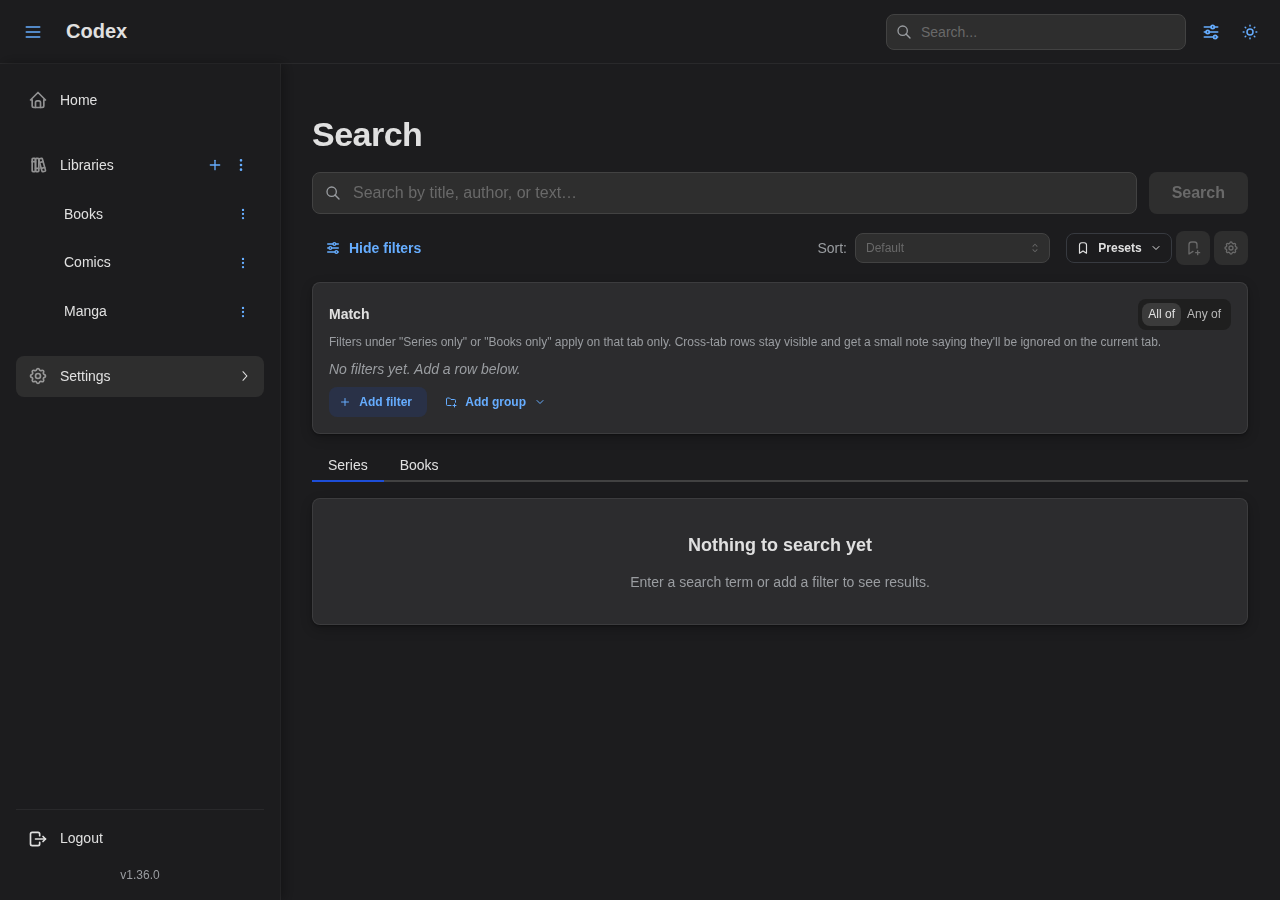
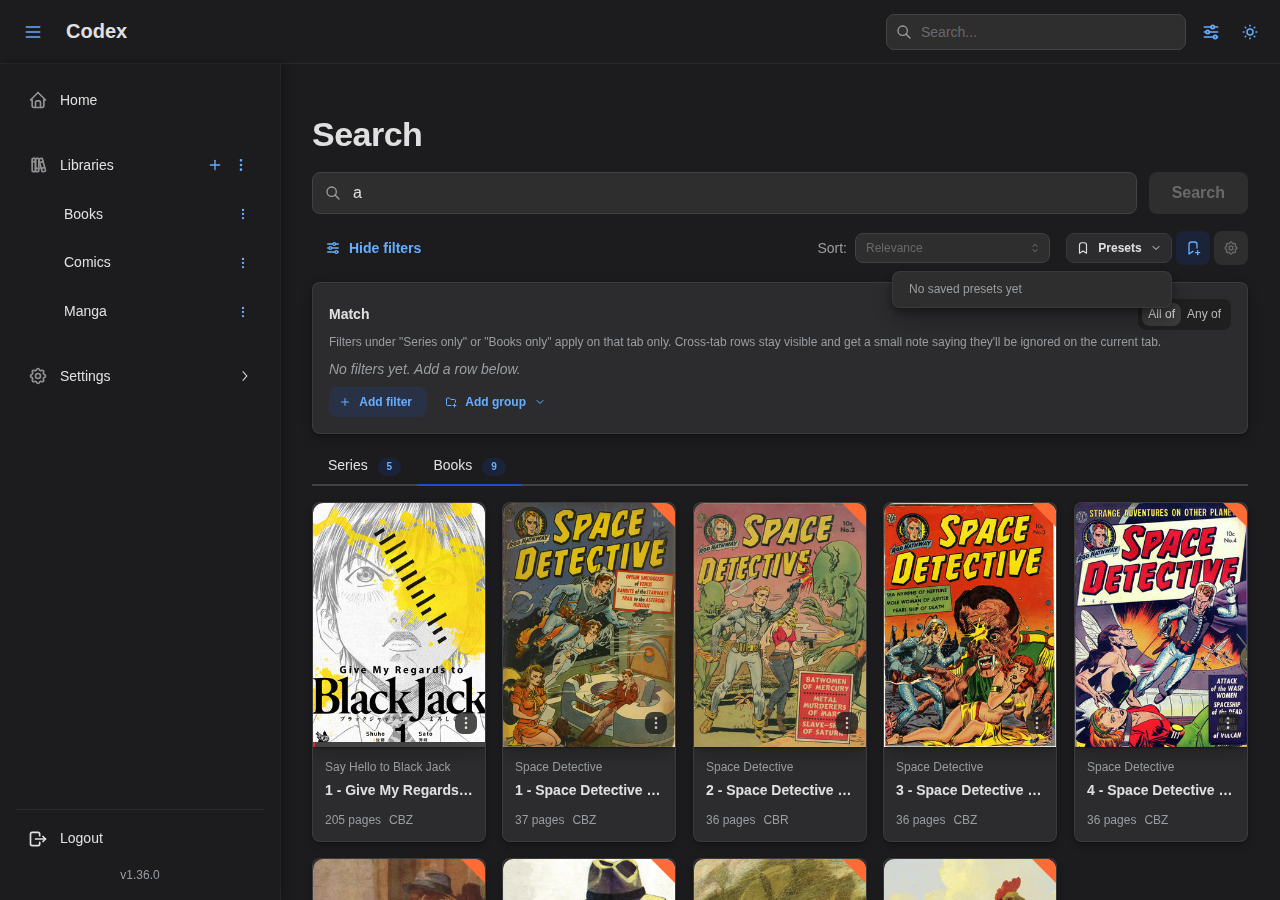
The page offers:
- A text query box with debounced search.
- A filter builder that exposes the full condition grammar, including
nested
allOf/anyOfgroups and operators not available on the chip-based list-page panels. Rating filters (My rating, Community rating) live here only; they take a 0-10 value with one decimal, and are stored on the 1-100 scale described under Rating scale. - A JSON section under the builder, collapsed by default. It shows the rule as Codex stores it, and accepts a pasted one: Copy it to move a tuned filter to a collection rule or into a bug report, paste and Apply to rebuild the rows from someone else's. A rule outside the grammar is refused with the offending part named.
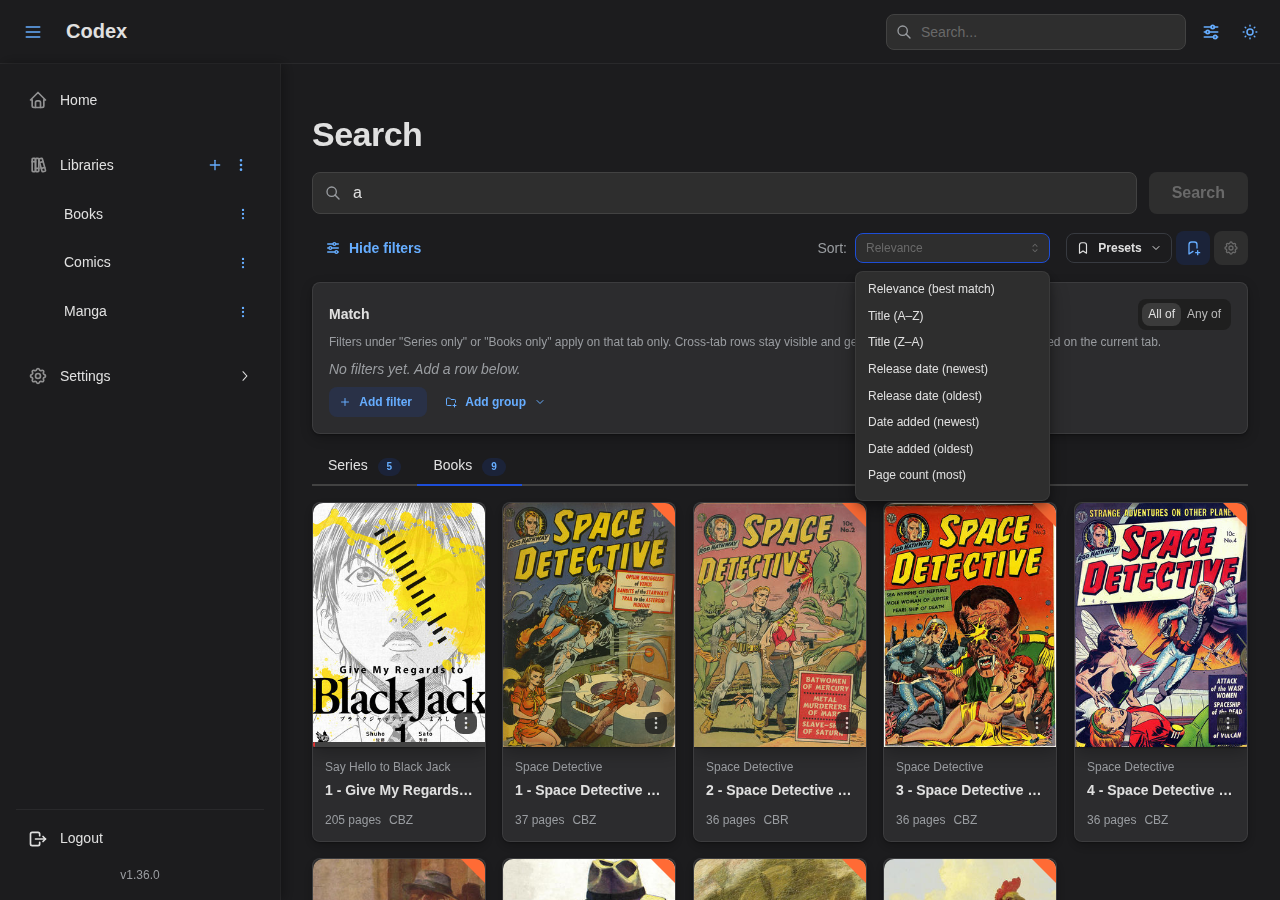
- A sort selector. When a text query is present, a "Relevance (best match)" option appears at the top; clearing the selector returns to the default sort.
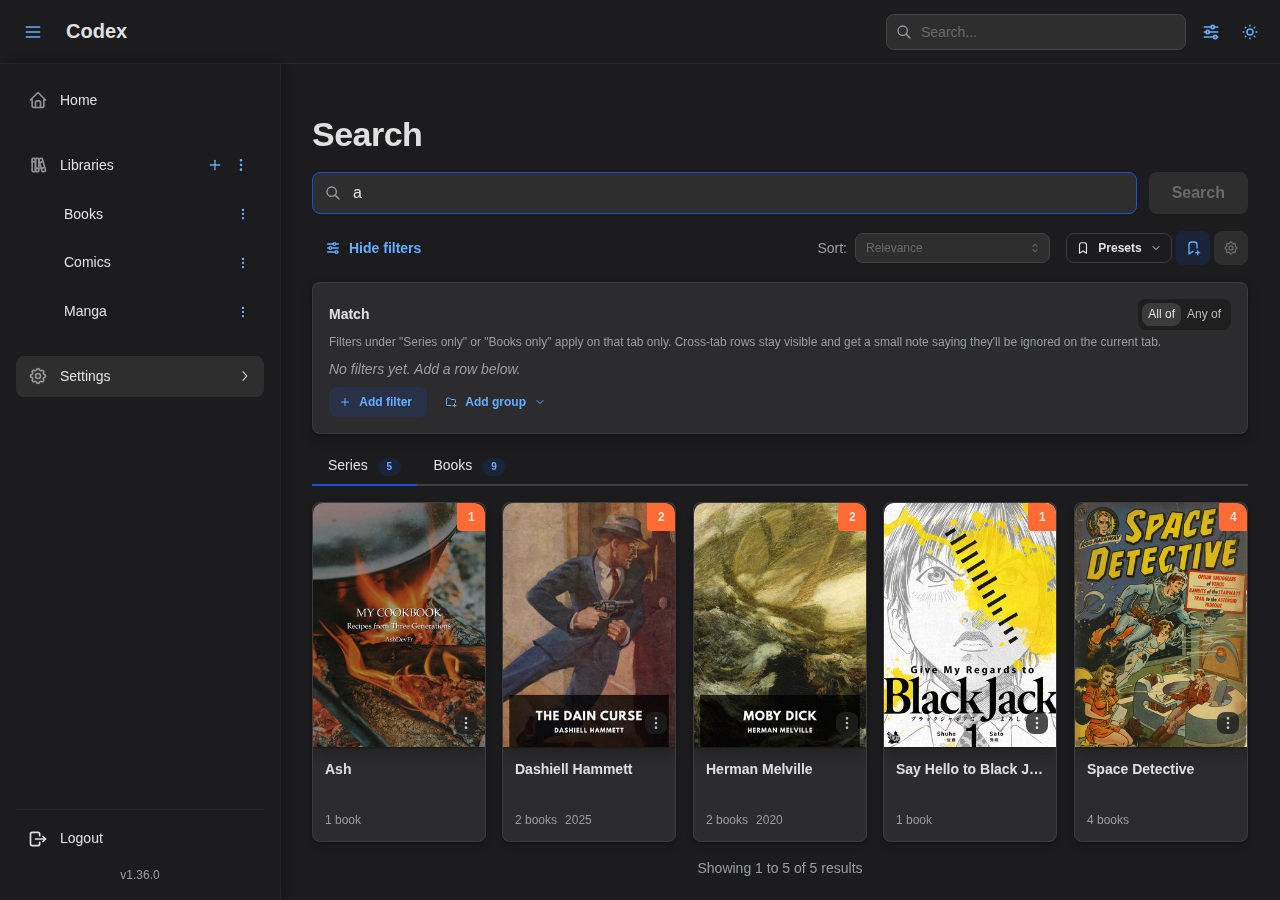
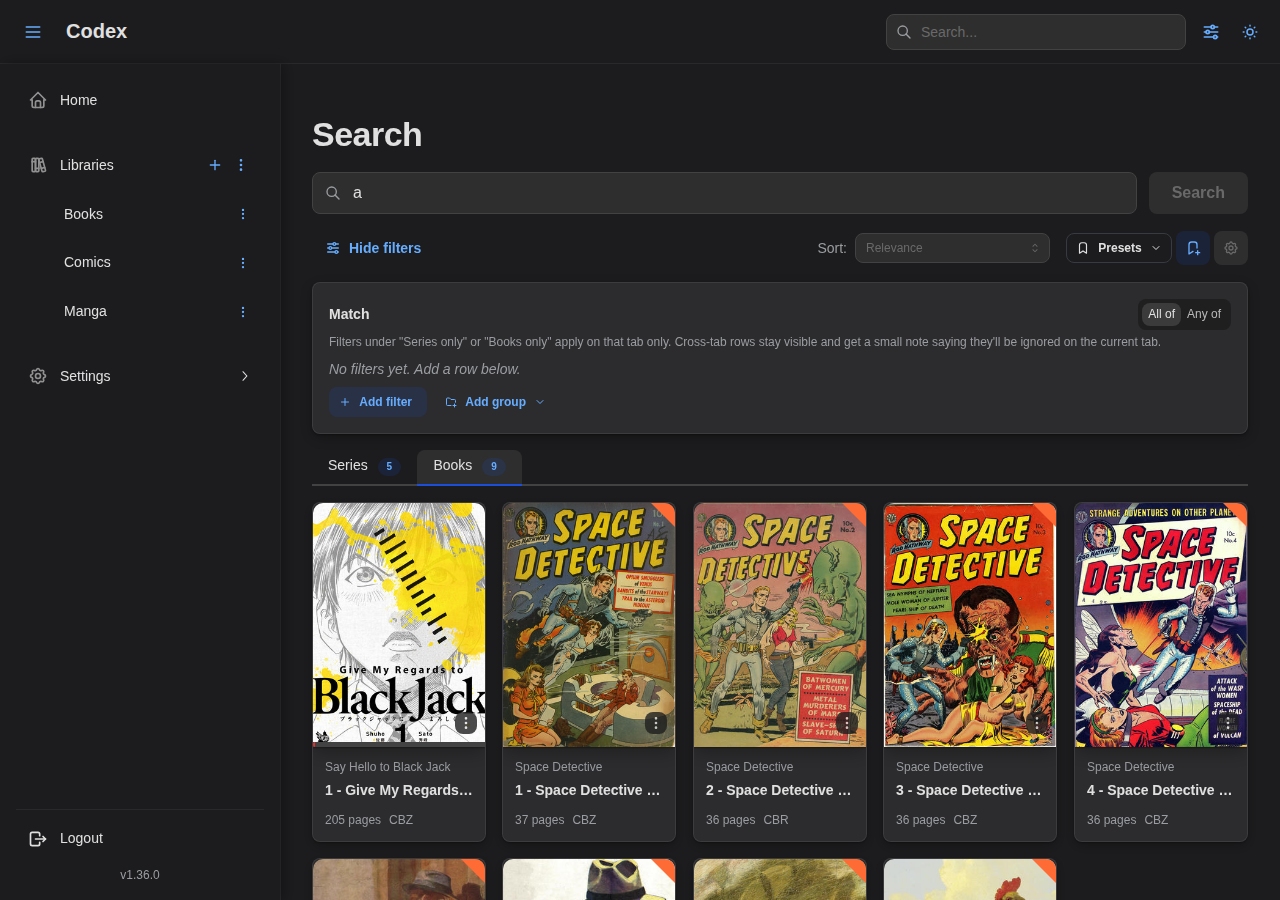
- Series / Books tabs with live counts. Both tabs fetch in parallel so the counts update as soon as you change the filter.
- A Presets sidebar for saving and reloading the current
(filter, query, sort)combination — see Filter Presets below.
Results render in the active tab as soon as the query or filter changes:
Switch to the Books tab to see book-level matches for the same query and filter:
When a text query is set, the Sort selector exposes a "Relevance (best match)" option backed by the fuzzy index, alongside the default sort fields:
If fuzzy search is enabled on the server, a "Fuzzy enabled" badge appears next to the page title. See Full-Text Search for the search-side behaviour.
Shareable URLs
The page encodes its full state in the URL so you can bookmark or share a
specific search. The q, sort, tab, and page parameters are
human-readable; the filter expression rides in a base64url-encoded c
parameter to keep nested conditions compact.
When a filter is too complex to fit in the URL, the page drops the c
parameter and shows a yellow notice suggesting you save it as a preset. The
preset will reload exactly as built, no length limit.
Filter Presets
A preset is a saved filter combination you can reload later. Presets are per-user — only you can see, edit, or delete your own.
Where to save and load presets
Codex has two preset entry points:
- List-page filter drawer. Open the filter drawer on the series or books list page and use the Presets controls at the top. Saves use the chip- based grammar of the drawer.
- Advanced search sidebar on
/search. Saves include the text query, the full filter expression, and the sort — everything needed to reproduce the search.
Both entry points share the same storage and the same Manage presets modal, which lists all of your presets grouped by where they're used ("List pages" / "Advanced search") with inline rename and delete.
Saving a preset
- Build a filter (and, on
/search, optionally add a query and sort). - Click the Save preset icon.
- Name the preset.
- On a list page that's scoped to a single library, choose This library
or All libraries:
- This library — the preset appears only on this library's filter panel.
- All libraries — the preset appears on every library's filter panel, including the "All libraries" cross-library view.
- Save.
When you save from the "All libraries" view, the preset is always global.
Applying a preset
Open the filter drawer (or the /search sidebar) and pick a preset from the
"Apply preset…" menu. The page state updates immediately and pagination
returns to page 1.
Presets saved from the advanced search page may use filters that the chip-
based list-page drawer can't represent — for example, year ranges, nested
groups, or path/format filters. When you try to apply one of those on a list
page, Codex surfaces a notification suggesting you open the preset on
/search instead.
Renaming and deleting
The Manage presets modal (cog icon next to "Save preset") shows all of your presets and offers inline rename + delete. Deleting prompts for confirmation; renames take effect immediately.
Advanced Filtering (API)
For complex queries, use the POST /series/list or POST /books/list endpoints.
Condition Structure
Filters use a tree structure with combinators:
{
  "condition": {
    "allOf": [
      { "genre": { "operator": "is", "value": "Action" } },
      { "genre": { "operator": "isNot", "value": "Horror" } }
    ]
  }
}
Combinators
| Combinator | SQL Equivalent | Description |
|---|---|---|
allOf | AND | All conditions must match |
anyOf | OR | Any condition can match |
Field Operators
Used by string-valued fields (genre, tag, name, path, format, …).
| Operator | Description | Example |
|---|---|---|
is | Equals | {"operator": "is", "value": "Action"} |
isNot | Not equals | {"operator": "isNot", "value": "Horror"} |
isNull | Field is null | {"operator": "isNull"} |
isNotNull | Field has value | {"operator": "isNotNull"} |
contains | Contains substring | {"operator": "contains", "value": "bat"} |
doesNotContain | Does not contain substring | {"operator": "doesNotContain", "value": "draft"} |
beginsWith | Starts with | {"operator": "beginsWith", "value": "The"} |
endsWith | Ends with | {"operator": "endsWith", "value": "Volume 1"} |
Number Operators
Used by numeric fields (year, pageCount).
| Operator | Description | Example |
|---|---|---|
eq | Equals | {"operator": "eq", "value": 2024} |
ne | Not equals | {"operator": "ne", "value": 0} |
gt | Greater than | {"operator": "gt", "value": 100} |
gte | Greater than or equal | {"operator": "gte", "value": 100} |
lt | Less than | {"operator": "lt", "value": 500} |
lte | Less than or equal | {"operator": "lte", "value": 500} |
between | Within a range (open-ended supported) | {"operator": "between", "min": 2000, "max": 2010} |
isNull | No value set | {"operator": "isNull"} |
isNotNull | Has a value | {"operator": "isNotNull"} |
between accepts either bound as null to express open-ended ranges, e.g.
{"min": 2000, "max": null} means "year >= 2000".
Date Operators
Used by timestamp fields (dateAdded). Values are ISO-8601 UTC strings.
| Operator | Description | Example |
|---|---|---|
after | Strictly after | {"operator": "after", "value": "2024-01-01T00:00:00Z"} |
before | Strictly before | {"operator": "before", "value": "2024-12-31T23:59:59Z"} |
onOrAfter | At or after | {"operator": "onOrAfter", "value": "2024-01-01T00:00:00Z"} |
onOrBefore | At or before | {"operator": "onOrBefore", "value": "2024-12-31T23:59:59Z"} |
between | Within a range (open-ended supported) | {"operator": "between", "start": "2024-01-01T00:00:00Z", "end": "2024-06-30T23:59:59Z"} |
isNull | No value set | {"operator": "isNull"} |
isNotNull | Has a value | {"operator": "isNotNull"} |
Series Filter Fields
| Field | Description | Operators |
|---|---|---|
libraryId | Library UUID | is, isNot, in, notIn |
genre | Genre name | is, isNot |
tag | Tag name | is, isNot |
sharingTag | Sharing tag name (admin) | is, isNot |
status | Publication status | is, isNot |
publisher | Publisher name | is, isNot, isNull, isNotNull |
language | Language code (BCP47) | is, isNot, isNull, isNotNull |
name | Series name | is, isNot, contains, beginsWith |
titleSort | Sort title | is, isNot, contains, beginsWith |
readStatus | Reading status (unread / in_progress / read) | is, isNot |
completion | Series is complete | isTrue, isFalse |
hasExternalSourceId | Linked to an external source | isTrue, isFalse |
hasUserRating | User has rated this series | isTrue, isFalse |
userRating | Your own rating, 1-100 (see Rating scale) | All number operators |
communityRating | Average rating across all users, 1-100 | All number operators |
isTracked | Release tracking enabled | isTrue, isFalse |
year | Publication year | All number operators |
author | Author name (matches any role) | is, isNot, contains, beginsWith |
dateAdded | When the series first appeared in the library | All date operators |
Book Filter Fields
| Field | Description | Operators |
|---|---|---|
libraryId | Library UUID | is, isNot, in, notIn |
seriesId | Series UUID | is, isNot, in, notIn |
genre | Genre name (inherited from series) | is, isNot |
tag | Tag name (inherited from series) | is, isNot |
title | Book title | is, isNot, contains |
readStatus | Reading status | is, isNot |
hasError | Has parsing error | isTrue, isFalse |
bookType | Book type classification | is, isNot, isNull, isNotNull |
path | File path (substring match) | is, isNot, contains, beginsWith, endsWith |
format | File format (cbz, cbr, epub, pdf, …) | is, isNot |
pageCount | Number of pages | All number operators |
dateAdded | When the book first appeared in the library | All date operators |
UUID Operators
UUID fields (libraryId, seriesId) accept a single value or a list:
| Operator | Payload | Meaning |
|---|---|---|
is / isNot | value | Matches, or does not match, one ID |
in / notIn | values | Matches any, or none, of several IDs |
{ "libraryId": { "operator": "in", "values": ["<manga-uuid>", "<comics-uuid>"] } }
An empty in list names nothing and so matches nothing; an empty notIn list
excludes nothing and so matches everything.
Rating scale
userRating and communityRating are on the stored 1-100 scale, not the
1-10 scale the interface shows. The API is 1-100 everywhere; the conversion
happens only in the UI, which displays and accepts 0-10 with one decimal.
So "series I rated 8.5 or better" is:
{ "userRating": { "operator": "gte", "value": 85 } }
Two things to know about how ratings compare:
- Unrated series are excluded by every comparison, including
ne. A series you have not rated has no value to compare, souserRatingne90 does not return it. UseisNullto find unrated series andisNotNullfor rated ones. communityRatingis an average, so it can exclude a series you personally rated highly. If you rated something 9.0 and someone else rated it 8.0, its community rating is 8.5 andcommunityRating > 85will not return it.
userRating depends on who is asking: the same filter returns different results
for different users. communityRating is a server-wide fact and is the same for
everyone.
Example Queries
Simple Genre Filter
{
  "condition": {
    "genre": { "operator": "is", "value": "Action" }
  }
}
Multiple Genres (OR)
Match series with Action OR Comedy:
{
  "condition": {
    "anyOf": [
      { "genre": { "operator": "is", "value": "Action" } },
      { "genre": { "operator": "is", "value": "Comedy" } }
    ]
  }
}
Genre with Exclusion
Match Action series but exclude Horror:
{
  "condition": {
    "allOf": [
      { "genre": { "operator": "is", "value": "Action" } },
      { "genre": { "operator": "isNot", "value": "Horror" } }
    ]
  }
}
Complex Nested Query
(Action AND Comedy) OR (Fantasy AND NOT Horror):
{
  "condition": {
    "anyOf": [
      {
        "allOf": [
          { "genre": { "operator": "is", "value": "Action" } },
          { "genre": { "operator": "is", "value": "Comedy" } }
        ]
      },
      {
        "allOf": [
          { "genre": { "operator": "is", "value": "Fantasy" } },
          { "genre": { "operator": "isNot", "value": "Horror" } }
        ]
      }
    ]
  }
}
Read Status Filter
Find series currently being read:
{
  "condition": {
    "readStatus": { "operator": "is", "value": "in_progress" }
  }
}
Multi-Field Filter
Ongoing Action series with Favorite tag:
{
  "condition": {
    "allOf": [
      { "status": { "operator": "is", "value": "ongoing" } },
      { "genre": { "operator": "is", "value": "Action" } },
      { "tag": { "operator": "is", "value": "Favorite" } }
    ]
  }
}
Book Type Filter
Find all manga books:
{
  "condition": {
    "bookType": { "operator": "is", "value": "manga" }
  }
}
Find books without a type classification:
{
  "condition": {
    "bookType": { "operator": "isNull" }
  }
}
Format Filter
CBZ files only:
{
  "condition": {
    "format": { "operator": "is", "value": "cbz" }
  }
}
Year Range
Series published between 2000 and 2009 (inclusive):
{
  "condition": {
    "year": { "operator": "between", "min": 2000, "max": 2009 }
  }
}
Open-ended: everything from 2020 onward:
{
  "condition": {
    "year": { "operator": "gte", "value": 2020 }
  }
}
Recently Added
Books added in the last 30 days (the client supplies the cutoff ISO timestamp):
{
  "condition": {
    "dateAdded": { "operator": "onOrAfter", "value": "2026-04-19T00:00:00Z" }
  }
}
Full-Text Search
Combine full-text search with condition filters:
{
  "fullTextSearch": "batman",
  "condition": {
    "genre": { "operator": "is", "value": "Action" }
  }
}
The text query is combined with the structured condition using AND logic and respects the user's sharing-tag permissions.
Fuzzy Matching
When the search.fuzzy.enabled server setting is on, text queries route
through an in-memory fuzzy index that tolerates typos and partial matches and
ranks results by relevance. The index is updated incrementally as items are
added, edited, or removed.
When fuzzy is off, the same query falls back to a case-insensitive LIKE
match against titles. No behavioural difference besides ranking quality.
Relevance Sort
When a text query is set, the /search page defaults to ranking results by
fuzzy score. You can override this from the sort dropdown to use any of the
standard sort fields (release date, title, page count, etc.) — the relevance
ranking is dropped when you do so.
The API mirrors this:
sortunset +fullTextSearchset → implicit relevance ranking.sort=relevance→ explicit relevance (also acceptsscoreandrelevance,asc/desc); falls back to the natural default if no query is present.- Any other explicit
sortvalue → that sort wins.
Global Search
The header search bar searches both series and books:
- Type at least 2 characters.
- Results appear in a dropdown grouped by type.
- Click a result to navigate, press Enter for the simple results page, or
click Advanced search → to open
/searchpre-filled with your query.
Performance Tips
- Use specific filters: More specific filters run faster
- Combine with library_id: Always include library_id when filtering within a library
- Avoid deep nesting: Very deeply nested conditions may be slower
- Use pagination: Always paginate results for large libraries
Next Steps
- API Documentation - Full API reference
- Libraries - Library management
- OPDS - OPDS catalog access