Custom Metadata & Templating
Codex allows you to store and display custom metadata for your series beyond the standard fields (title, genre, tags, etc.). This guide covers how to use custom metadata and configure its display using Handlebars templates.
Overview
Custom metadata is a flexible JSON object that can contain any data you want to associate with a series or book. It's displayed on detail pages using a configurable Handlebars template that renders to Markdown.
Templates have access to multiple data sources:
type- Context type discriminator:"series"or"book"customMetadata- Your custom JSON data stored on the entitymetadata- Built-in metadata fields (title, genres, publisher, etc.)externalIds- External IDs from metadata providersseries- (Book context only) Embedded parent series context for cross-referencing
Use cases:
- Track reading progress and personal ratings
- Link to external databases (MyAnimeList, AniList, etc.)
- Store collection details (edition, condition, purchase info)
- Add personal notes and reviews
- Track technical information (resolution, audio, subtitles)
Storing Custom Metadata
Custom metadata is stored as a JSON object on each series. You can set it via the API or through the series metadata editor.
JSON Structure
Custom metadata can be any valid JSON object:
{
  "status": "In Progress",
  "rating": 8.5,
  "priority": 5,
  "startedDate": "2024-01-15",
  "notes": "Great series, highly recommended!",
  "links": [
    { "name": "MyAnimeList", "url": "https://myanimelist.net/manga/1" },
    { "name": "AniList", "url": "https://anilist.co/manga/1" }
  ],
  "tags": ["favorite", "action", "must-read"]
}
API Endpoints
Update custom metadata via the API:
# Update series custom metadata
PATCH /api/v1/series/{id}
Content-Type: application/json

{
  "customMetadata": {
    "status": "Completed",
    "rating": 9
  }
}
Display Templates
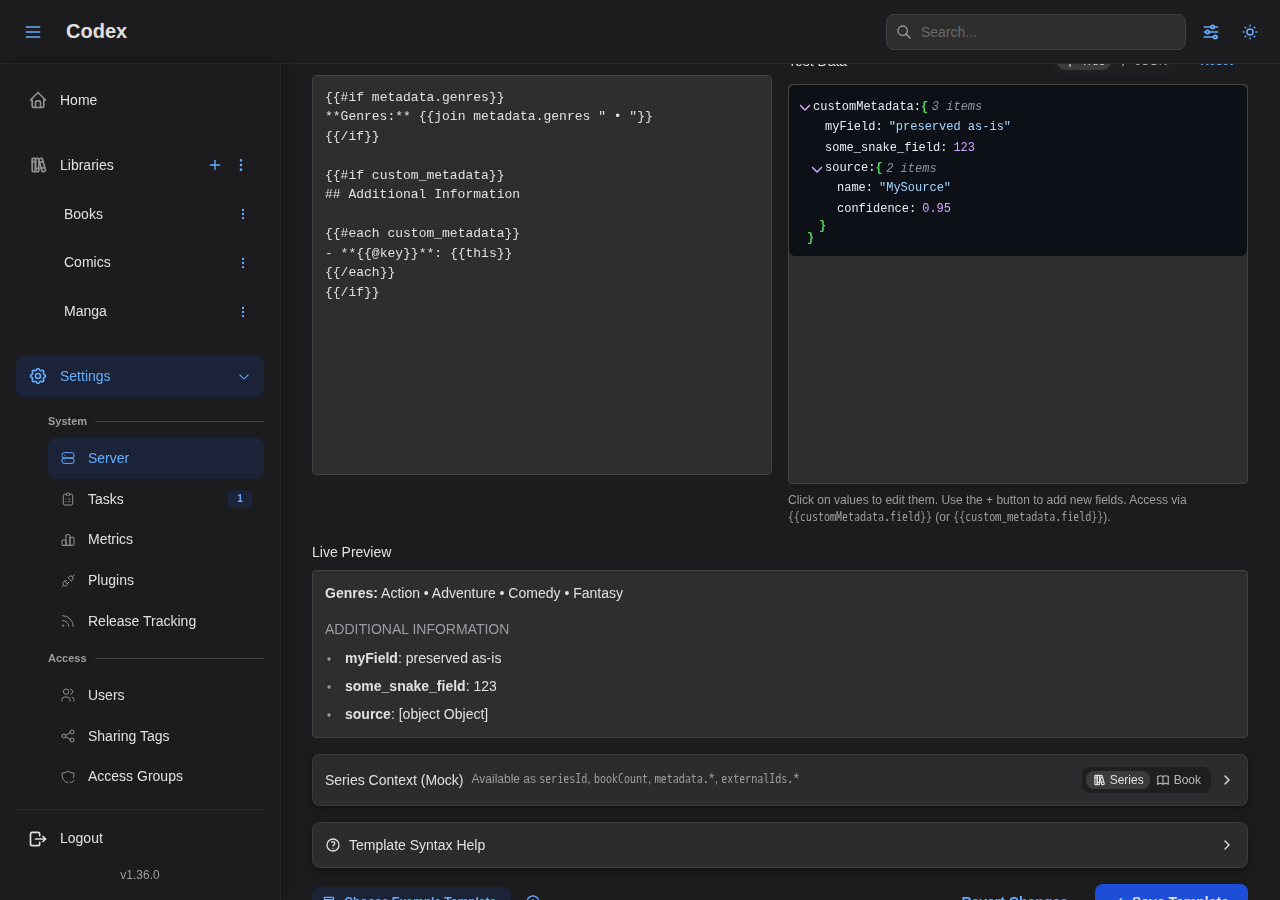
Custom metadata is rendered on the series detail page using a Handlebars template. The template is configured in Settings > Server Settings > Custom Metadata Template.
How Templates Work
- Your custom metadata is passed to the template as
customMetadata - Built-in series metadata is passed as
metadata - The template is rendered using Handlebars syntax
- The output (Markdown) is displayed using styled components
Default Template
The default template displays genres from built-in metadata and custom fields as a bullet list:
Configuring Templates
- Navigate to Settings > Server Settings
- Find the Custom Metadata Template section
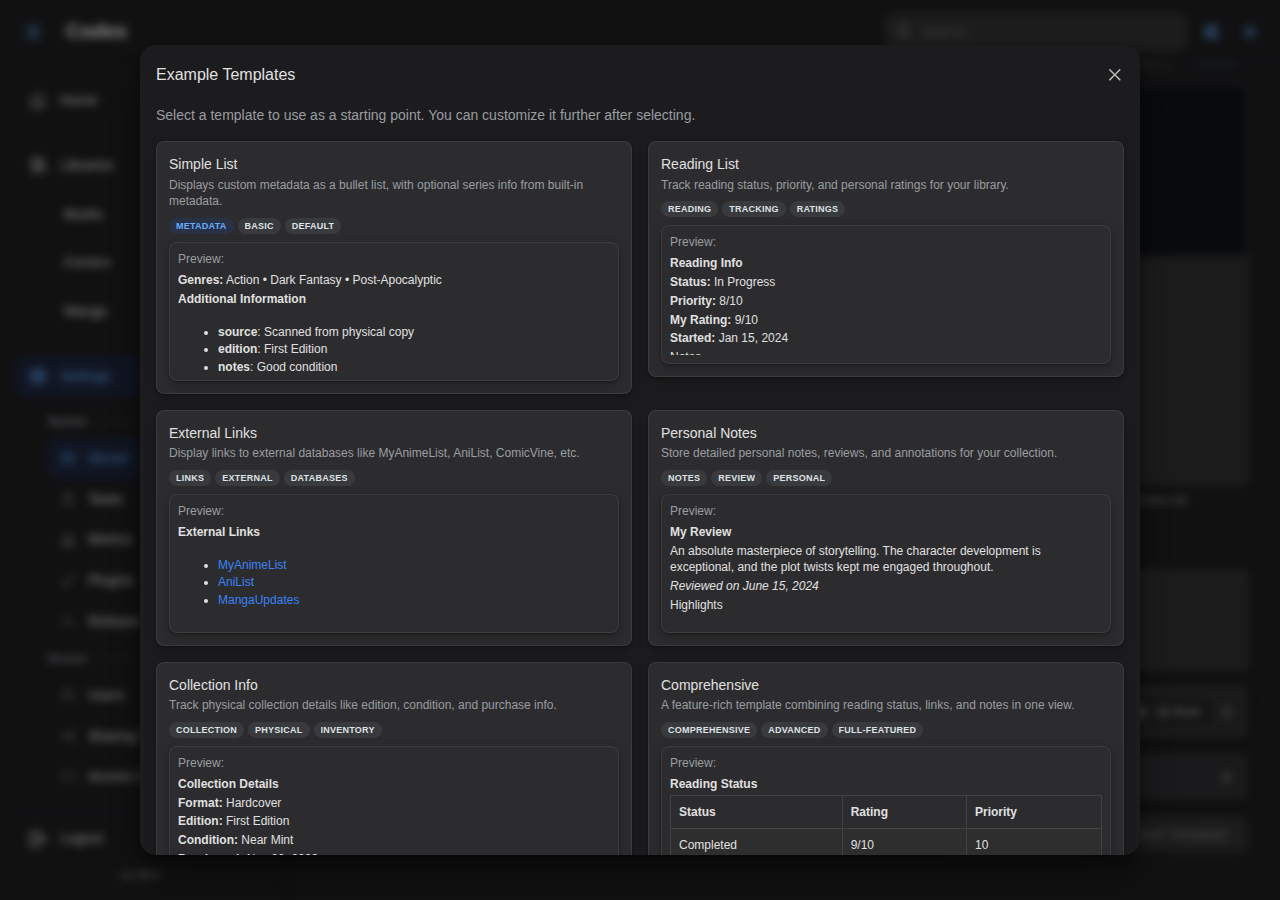
- Edit the template or select a pre-built example
- Use the live preview to test your changes
- Save your changes
Handlebars Syntax
Templates use Handlebars syntax with additional custom helpers.
Basic Syntax
Available Helpers
Codex provides these custom helpers:
| Helper | Description | Usage |
|---|---|---|
formatDate | Format a date string | {{formatDate value "MMM d, yyyy"}} |
ifEquals | Check if two values are equal | {{#ifEquals value1 value2}}...{{/ifEquals}} |
ifNotEquals | Check if two values are not equal | {{#ifNotEquals value1 value2}}...{{/ifNotEquals}} |
json | Output JSON representation | {{json value}} |
truncate | Truncate string to length | {{truncate value 100 "..."}} |
lowercase | Convert to lowercase | {{lowercase value}} |
uppercase | Convert to uppercase | {{uppercase value}} |
capitalize | Capitalize first letter | {{capitalize value}} |
first | Get first N items of array | {{#first items 3}}...{{/first}} |
join | Join array with separator | {{join array ", "}} |
exists | Check if value exists | {{#exists value}}...{{/exists}} |
length | Get length of array/string | {{length array}} |
gt | Greater than comparison | {{#gt value1 value2}}...{{/gt}} |
lt | Less than comparison | {{#lt value1 value2}}...{{/lt}} |
and | Logical AND | {{#and cond1 cond2}}...{{/and}} |
or | Logical OR | {{#or cond1 cond2}}...{{/or}} |
lookup | Dynamic property access | {{lookup object key}} |
default | Provide default value | {{default value "fallback"}} |
Helper Examples
Date Formatting:
Date formats use date-fns format strings:
yyyy-MM-dd→ 2024-01-15MMM d, yyyy→ Jan 15, 2024MMMM d, yyyy→ January 15, 2024MMMM d, yyyy 'at' h:mm a→ January 15, 2024 at 2:30 PM
Conditional Display:
Array Operations:
Default Values:
Template Context
Templates receive a context object that varies depending on whether the template is rendered on a series or book detail page. Use the type field to distinguish between them.
Top-Level Fields
| Field | Type | Series | Book | Description |
|---|---|---|---|---|
type | string | "series" | "book" | Context type discriminator |
seriesId | string | Yes | Yes | Series UUID |
bookCount | number | Yes | No | Number of books in the series |
bookId | string | No | Yes | Book UUID |
libraryId | string | No | Yes | Library UUID |
fileFormat | string | No | Yes | File format (cbz, epub, pdf) |
pageCount | number | No | Yes | Number of pages |
fileSize | number | No | Yes | File size in bytes |
metadata | object | Yes | Yes | Metadata fields (structure differs) |
externalIds | object | Yes | Yes | External IDs mapped by source |
customMetadata | object | Yes | Yes | Custom metadata JSON |
series | object | No | Yes | Embedded parent series context |
Series Metadata Fields
When type is "series", the metadata object contains:
| Field | Type | Description |
|---|---|---|
metadata.title | string | Series title |
metadata.summary | string | Series description/summary |
metadata.publisher | string | Publisher name |
metadata.imprint | string | Publisher imprint |
metadata.year | number | Publication year |
metadata.status | string | Series status (e.g., "ongoing", "completed") |
metadata.totalVolumeCount | number | Expected total volume count (integer) |
metadata.totalChapterCount | number | Expected total chapter count (decimal; supports fractional chapters like 47.5) |
metadata.ageRating | number | Age rating (e.g., 13, 18) |
metadata.language | string | Primary language |
metadata.readingDirection | string | Reading direction (ltr, rtl, ttb) |
metadata.genres | string[] | List of genres |
metadata.tags | string[] | List of tags |
metadata.authors | array | Authors (name, role, sortName) |
metadata.externalRatings | array | External ratings (source, rating, votes) |
metadata.externalLinks | array | External links (source, url) |
metadata.alternateTitles | array | Alternate titles (title, label) |
Book Metadata Fields
When type is "book", the metadata object contains book-specific fields:
| Field | Type | Description |
|---|---|---|
metadata.title | string | Book title |
metadata.titleSort | string | Custom sort name |
metadata.number | number | Issue/chapter number |
metadata.subtitle | string | Book subtitle |
metadata.summary | string | Book description |
metadata.publisher | string | Publisher name |
metadata.imprint | string | Publisher imprint |
metadata.genre | string | Genre (ComicInfo-style single field) |
metadata.languageIso | string | Language code (ISO format) |
metadata.year | number | Publication year |
metadata.month | number | Publication month (1-12) |
metadata.day | number | Publication day (1-31) |
metadata.volume | number | Volume number |
metadata.isbns | string | ISBN(s) |
metadata.bookType | string | Book type (comic, manga, novel, etc.) |
metadata.edition | string | Edition info |
metadata.translator | string | Translator name |
metadata.originalTitle | string | Original title (translations) |
metadata.originalYear | number | Original publication year |
metadata.genres | string[] | Genre names |
metadata.tags | string[] | Tag names |
metadata.subjects | string[] | Subject/topic tags |
metadata.authors | array | Authors (name, role, sortName) |
metadata.awards | array | Awards (name, year, category, won) |
metadata.externalLinks | array | External links (source, url) |
Cross-Referencing Parent Series
Book contexts include the full parent series context under series.*. This lets you reference series-level data from a book template:
Type-Aware Templates
Use the type discriminator to create templates that work for both series and books:
Metadata Examples
Display genres and publisher:
Show series status with capitalization:
Display external ratings:
Combine custom and built-in metadata:
Supported Markdown
The template output is rendered as Markdown with support for:
Headings
# Large Heading
## Section Heading
### Subsection
Lists
- Item 1
- Item 2
- Item 3
List items with **label**: value pattern are styled as key-value rows:
- **Status**: Completed
- **Rating**: 9/10
- **Priority**: High
Tables
| Column 1 | Column 2 | Column 3 |
|----------|----------|----------|
| Value 1  | Value 2  | Value 3  |
| Value 4  | Value 5  | Value 6  |
Links
[Link Text](https://example.com)
External links (starting with http) open in a new tab.
Code
Inline code:
File ID: `ABC123`
Code blocks:
```
Resolution: 1920x1080
Audio: Japanese 5.1
```
Blockquotes
> This is a blockquote for important notes or warnings.
Text Formatting
**Bold text**
*Italic text*
~~Strikethrough text~~
Horizontal Rules
---
Example Templates
Codex includes several pre-built templates to get you started:
Simple List
Basic key-value display with optional genres from built-in metadata:
Reading List
Track reading progress and ratings:
External Links
Link to external databases:
Collection Info
Track physical collection details:
With Tables
Display data in tables:
Series Info (Built-in Metadata)
Display only built-in series metadata:
Book Detail Template
Display book-specific information with series cross-referencing:
Complete Overview (Combined)
Combine custom tracking data with built-in series metadata:
Best Practices
Template Design
- Use conditional blocks: Always wrap sections in
{{#if}}to handle missing data gracefully - Provide defaults: Use
{{default value "fallback"}}for optional fields - Keep it readable: Use headings and sections to organize information
- Test with sample data: Use the live preview in settings to test your template
Data Structure
- Use consistent keys: Stick to a naming convention (camelCase recommended)
- Use ISO dates: Store dates as ISO strings (e.g.,
2024-01-15) for reliable formatting - Group related data: Use nested objects for related information
- Use arrays for lists: Store multiple items as arrays for easy iteration
Performance
- Keep templates simple: Complex nested loops may slow rendering
- Limit output size: Templates have a 100KB output limit
- Use efficient helpers: Prefer
existsoveriffor null checks
Troubleshooting
Template Errors
If your template shows an error:
- Check for unclosed blocks (
{{#if}}needs{{/if}}) - Verify helper names are spelled correctly
- Check for mismatched quotes in strings
- Use the live preview to see error messages
Data Not Displaying
If custom metadata isn't showing:
- Verify the series has custom metadata set
- Check that your template handles the data structure correctly
- Ensure conditional blocks match your data (e.g.,
customMetadata.fieldvscustomMetadata.nested.field)
Styling Issues
If the output doesn't look right:
- Verify your Markdown syntax is correct
- Check that tables have proper header rows
- Ensure code blocks use triple backticks
Next Steps
- Filtering & Search - Filter series by custom metadata
- API Documentation - Full API reference
- Libraries - Library management